
Goblin Tools
Skyhook BelgiumProductivity
4.6435.00 Reviews
- Version
- 2.1.1
- Installs
- 100.00K
- Age Rating
- Everyone
Screenshots
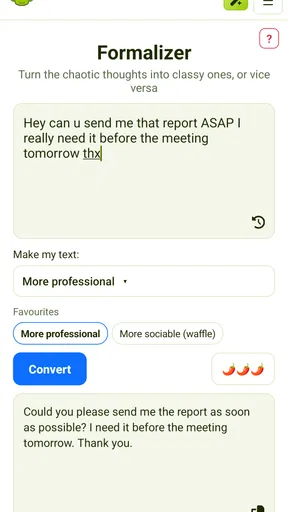
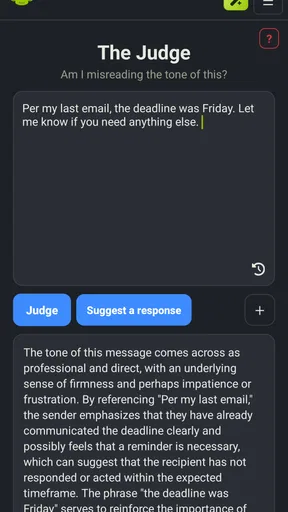
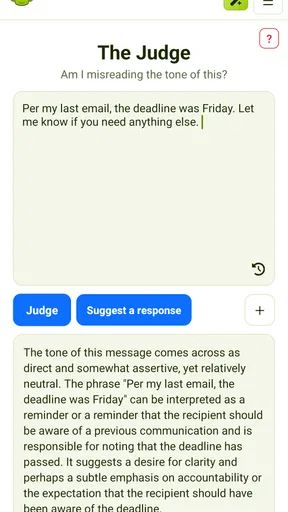
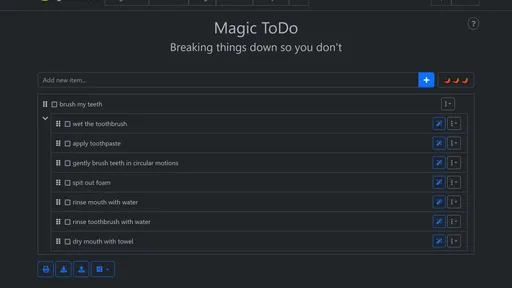
Our Review of Goblin Tools
 Analysis by Appyee
I judge a planning app less by how many tasks it can hold than by whether it helps me get past the moment when I cannot decide what to do first. That is where Goblin Tools has a useful, distinctive aim: it is a productivity app built around making everyday thinking and task handling more manageable, especially for neurodivergent users. I would approach it as a practical aid for turning a vague intention into a next step, not as a complete replacement for every calendar, notes app, or project board already on my phone.
Starting with one task, not a whole life overhaul
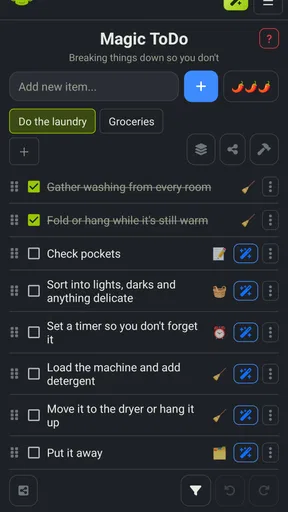
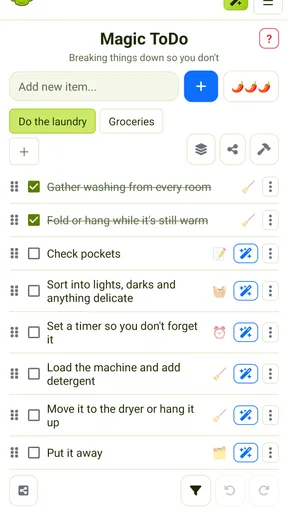
My most sensible way to begin is with a single task that feels awkwardly large or unclear. Instead of moving an entire to-do list into a new system, I would pick something like “sort out the paperwork” and use the app to help make the work feel more approachable. The benefit is not that the task disappears; it is that a broad phrase can become something I can actually consider doing next. That distinction matters on low-energy days, when a long list can feel like evidence of failure rather than a plan.
I would also keep the first session small. Try one real task, see whether the suggested breakdown suits the way you think, and adjust it before relying on it. If a proposed step is still too broad, split it again yourself; if the result is over-detailed, keep only the parts that help. Treating the output as a draft rather than an instruction is a useful habit. It keeps the tool supportive without handing it authority over how you spend your time.
A routine that works better than endless reorganizing
A helpful routine is to use the app at the same decision point each day: when I sit down to begin work, when I get home, or when I notice I am circling a task without starting. I would choose a small number of priorities, make the first action clear, and then leave the rest of the list alone while I work. This avoids a common productivity trap: spending more effort arranging tasks than completing any of them.
For a realistic example, imagine that I have a form to complete, a message to answer, and a household chore I keep postponing. I can start with the form, identify the first action that does not require solving the whole thing, and do that before deciding what comes next. If the message needs a reply, I can define the reply as its own task rather than leaving it buried inside a vague reminder to “deal with messages.” The app is most useful in this kind of moment: when the obstacle is not a lack of ambition, but uncertainty about how to begin.
Where it fits among productivity apps
Compared with a basic checklist, Goblin Tools is most appealing when a task needs more thought before it is ready to become a checkbox. A checklist is faster for familiar errands and repeatable routines; it is often the better choice when all I need is a place to record “buy milk” or “send the file.” A full project-management app makes more sense for shared responsibilities, complex deadlines, or work that needs visible ownership across a team. Goblin Tools has a more personal role: helping me work out what a task means and how I might approach it.
That makes it a companion rather than an automatic replacement. I can use a task breakdown to clarify what I intend to do, then put the actual appointment or deadline in whichever calendar I already trust. Keeping those jobs separate is useful: a planning aid can help me think, while a calendar remains the place I check for time-specific commitments. If I expect one app to manage every note, meeting, reminder, and collaboration, this is probably not the right starting point.
What Exactly is Goblin Tools?
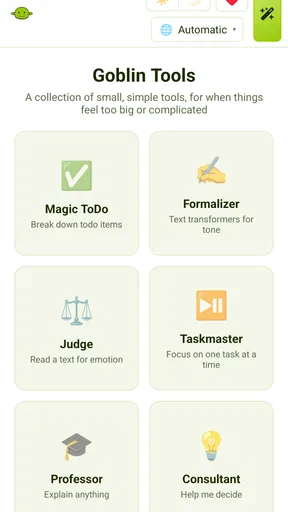
At its core, Goblin Tools is like having a Swiss army knife in your pocket but for all things digital. It's designed to help you organize, manage, and streamline your tasks with ease. Whether you're a student juggling assignments or a professional managing multiple projects, this app offers a suite of tools to keep you on track.
Feature-Packed Goodness
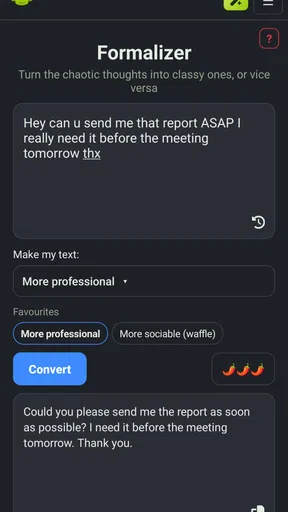
One of the first things I noticed about Goblin Tools is its sheer versatility. It's like opening a treasure chest of features, each more useful than the last. Let's dive into some of the standout elements:
- Task Manager: A clean, intuitive interface that helps you list down tasks, set priorities, and even schedule reminders. It's a godsend for anyone who thrives on to-do lists.
- Note Taking: Say goodbye to scattered sticky notes. The app allows you to jot down ideas, attach images, and even categorize notes by project or subject.
- Calendar Integration: Seamlessly syncs with your existing calendar apps, ensuring you never miss a deadline or meeting again.
- Focus Mode: A nifty feature that blocks distractions, helping you concentrate on the task at hand. Perfect for when you need to get into the zone.
User Experience: A Smooth Ride
Now, let's talk about the user experience. The developers clearly put a lot of thought into making Goblin Tools not just functional but also a joy to use. The interface is sleek and modern, with a color scheme that’s easy on the eyes. Navigating through the app feels intuitive, with everything exactly where you'd expect it to be.
Installation was a breeze, and the onboarding process was quick yet informative. Even if you're not the most tech-savvy person, you'll find yourself up and running in no time. And if, like me, you appreciate a bit of customization, you'll love the various themes and layout options available.
Settings and personal fit
Because people differ in how much structure helps, I would check the available controls before making the app part of a daily routine. The useful question is not “Which setup is best?” but “Does this result give me enough guidance without creating extra work?” Keep the amount of detail that helps you start, and edit or ignore anything that feels like noise. A tool for reducing friction should not become another task to maintain.
For repeated responsibilities, I would save a simple wording pattern outside the app if that helps me remember how to describe them clearly: name the outcome, mention the real constraint, and focus on the next action. For example, “prepare for class” is broad; “find the assignment instructions and open the document” is easier to act on. This is a reusable planning habit, not a hidden feature, and it can make any task helper more useful. It also prevents me from expecting an app to infer context I have not given it.
Shortcuts that come from consistency
The fastest workflow is often not a clever trick but a repeatable order. I would capture a task when it occurs to me, clarify it once when I sit down to plan, and then avoid rewriting it every time I feel uncertain. If I return to the same kind of task regularly, I can notice which first steps tend to work and use that knowledge next time. The payoff is less time spent negotiating with the list and more time taking a concrete action.
There is a trade-off here: breaking work down can make a difficult task feel possible, but too many tiny steps can clutter the plan and distract from the outcome. I would stop dividing a task when the next action is clear enough to begin. For a quick chore, a single reminder may be all I need; for an unfamiliar assignment or a complicated errand, a few intermediate steps may be worthwhile. Matching the amount of structure to the task is more effective than applying the same level of detail to everything.
Who benefits, and who may prefer another tool
I can see this being particularly useful for someone who knows what they need to do but gets stuck translating that intention into a start. Students facing open-ended assignments, people juggling personal admin, and anyone who finds an unstructured list hard to act on may appreciate that emphasis. It can also help when interruptions leave you unsure where to resume: a clearly defined next action gives you a place to return to without reconstructing the whole plan.
On the other hand, I would skip it as a primary system if my main need were team coordination, shared project status, or a dependable record of appointments across a busy calendar. A standard checklist is lighter for short, routine errands, while a calendar is clearer for anything tied to a specific time. If I already have a system that reliably gets me moving, adding another place to manage tasks may create duplication rather than relief. The right test is whether the app reduces hesitation in my actual week, not whether it offers more structure in theory.
Practical limits and sensible expectations
Any task breakdown is only as useful as the context behind it. If I enter a vague request, I should expect to review the result rather than assume it understands my priorities, available time, energy, or personal circumstances. I would check suggested steps for accuracy and suitability, especially when a task involves an important deadline or other people. The app can help me think through work, but my judgement still decides what matters and what is realistic.
I would also avoid turning a plan into a promise that every step must be completed in order. Some tasks depend on information I do not yet have, and others become easier once I have spoken to someone or gathered materials. In those cases, the useful next action may be to ask a question or find the missing detail, not to keep subdividing the task. That is a small but important distinction: planning should reveal the next useful move, not pretend every uncertainty can be solved in advance.
Price, access, and the right expectations
Goblin Tools is a paid app at $3.49, so I would decide based on whether its particular approach solves a recurring problem for me. Its average rating is 4.6 from around 1.4 thousand ratings, with roughly 412 written reviews, and it has passed 100 thousand installs. Those figures suggest that it has found an audience, but they cannot tell me whether its style of support will suit my own habits. I would judge it by trying a genuine, recurring task rather than by expecting a rating to predict my experience.
Skyhook Belgium is the developer, and the current version is 1.3.0. The app was released on May 3, 2023, is rated for Everyone, and requires Android 6.0 or later. That makes the age rating broad, but I would still consider whether the app’s approach to planning fits the person who will use it. For a neurodivergent user, the appeal may be a more manageable bridge between intention and action; for someone who wants only a barebones list, its extra assistance may feel unnecessary.
Is It Worth Your Time?
So, is Goblin Tools worth downloading? In my opinion, absolutely. It's rare to find an app that combines functionality with such a user-friendly design. Whether you're organizing your personal life or managing work tasks, this app has something for everyone.
And let's be honest, in a world where we're constantly juggling multiple responsibilities, having a tool that helps streamline our workflow is nothing short of magic. The team behind Goblin Tools has clearly put a lot of thought into what users need, and it shows.
In conclusion, if you're looking for an app that’s both powerful and easy to use, give Goblin Tools a try. It might just become that trusty sidekick you never knew you needed. Now, go ahead and download it from your favorite app store and let those digital goblins work their magic!
Verdict
Strengths of Goblin Tools
- Intuitive user interface for easy navigation.
- Includes diverse tools for various tasks.
- Customizable settings enhance usability.
- Regular updates improve functionality.
- Supports multiple languages for inclusivity.
Limitations of Goblin Tools
- Some tools require in-app purchases.
- Occasional bugs may affect performance.
- High battery consumption during use.
- Limited offline functionality available.
- Advertisements can be intrusive at times.
Similar Picks in This Category
View All
Google Calendar
Google LLC4.6

Google Drive
Google LLC4.3

Google Assistant
Google LLC3.9

Microsoft OneDrive
Microsoft Corporation4.6

Samsung Calendar
Samsung Electronics Co., Ltd.4.1

Microsoft OneNote: Save Notes
Microsoft Corporation4.6
Frequently Asked Questions
What is Goblin Tools, and what does it offer?
Goblin Tools is a versatile app designed to enhance productivity and efficiency, offering features like task management, reminders, and collaboration tools. It's tailored for both personal and professional use, making it a great choice for those looking to streamline their workflow on Android or iOS devices.
How user-friendly is the interface of Goblin Tools?
Goblin Tools boasts an intuitive and clean interface, making it easy for users of all tech proficiency levels to navigate. Whether you're setting up tasks or collaborating with others, the app's design ensures a smooth experience, minimizing the learning curve typically associated with productivity apps.
Are there any costs associated with using Goblin Tools?
While Goblin Tools offers a free version with basic features, it also provides premium options for users seeking advanced functionalities. These may include enhanced collaboration tools, additional storage, and priority support, making it ideal for users who need more robust capabilities.
What are the key advantages of using Goblin Tools?
The main pros of using Goblin Tools include its comprehensive feature set, seamless integration with other apps, and strong focus on collaboration. It's designed to improve productivity, whether you're managing personal tasks or working on team projects, and it consistently receives updates to enhance functionality.
Are there any notable drawbacks to Goblin Tools?
One potential drawback of Goblin Tools is that some features are locked behind a premium subscription, which might not be ideal for users seeking a completely free solution. Additionally, while generally stable, occasional bugs may occur, though these are typically addressed promptly through updates.
